




Good Morning
01
Morning Brief
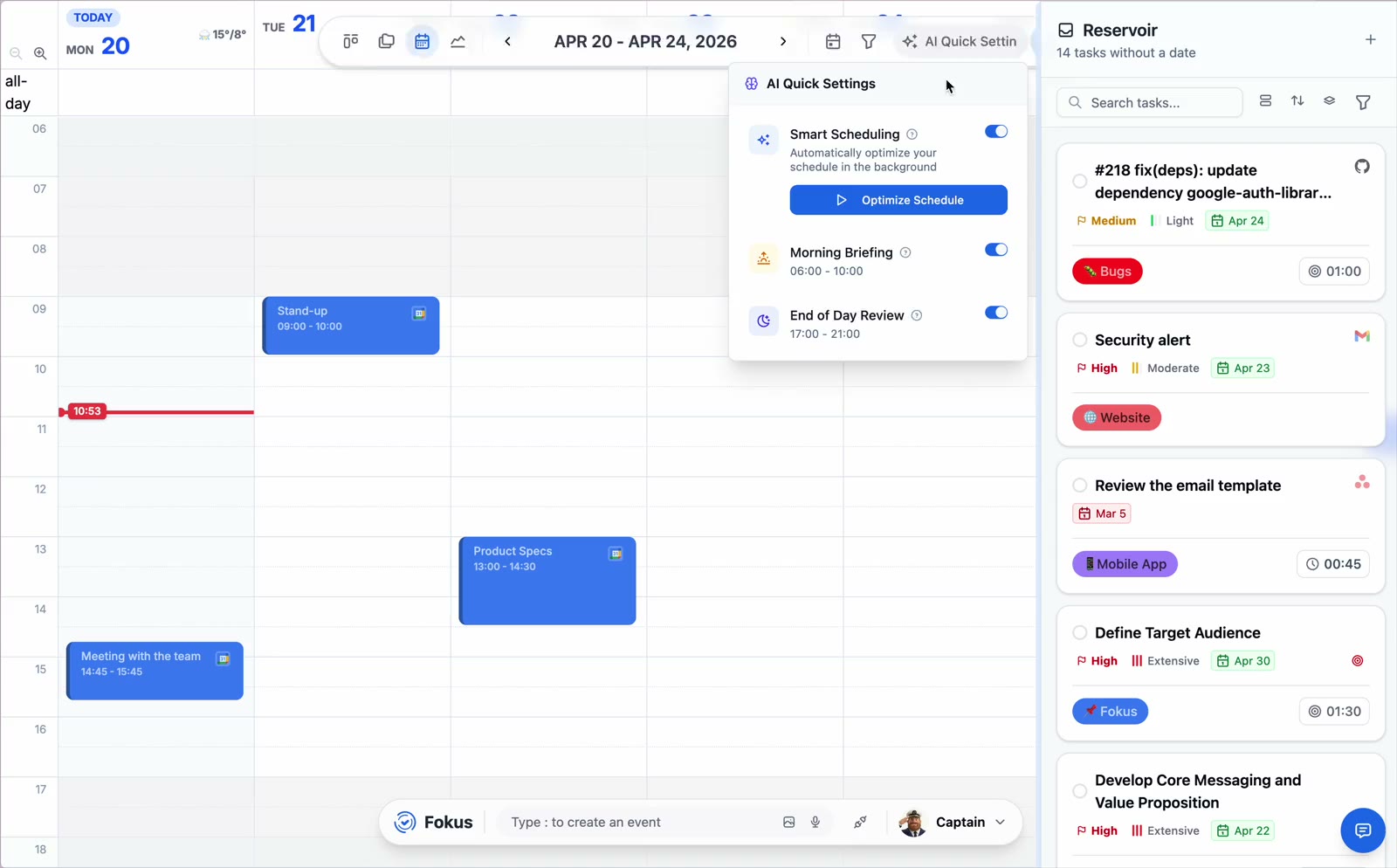
Start your day with a personalized briefing of priorities, deadlines, and opportunities to help you focus on what matters most.
It takes your tasks, reads your calendar, and builds a real schedule around your meetings — then rebuilds it the moment your day moves. A crew of AI agents handles the busywork in between.
Tasks · Calendar · Notes · Objectives — in one workspace
No credit card required — free during the public beta.





Your true AI companion
Captain Fokus is more than an AI assistant — it's a productivity partner that understands your workflow and adapts to how you work.
From breaking down complex projects into manageable tasks to intelligently scheduling your day based on priorities and deadlines, Captain Fokus learns from your habits and helps you work smarter, not harder.
Captain Fokus leads a specialized team of AI agents, each expertly trained to handle different aspects of your productivity workflow.
Start your day with a personalized briefing of priorities, deadlines, and opportunities to help you focus on what matters most.
Reflect on your day's accomplishments, unfinished tasks, and insights to help you close out strong and plan for tomorrow.
Quietly completes every quick capture with a priority, a time estimate and the right bucket, so your list stays plannable.
Breaks big goals into a reviewable plan of concrete, right-sized tasks — from vision to Monday's first step.
Reads your connected tools and quietly builds your personal knowledge graph — so every answer knows how your work connects.
Checks live traffic for every located event, blocks travel time on your calendar and nudges you when it's truly time to leave.
Switch any of these on per workspace when the work calls for it — they join the crew instantly, no setup day required.
Records meetings bot-free and returns a clean note with the summary, the decisions and action items with owners.
Triages your inbox into calm categories, drafts replies in your voice and turns commitments into tasks before they're lost.
A real phone call with your workspace — hear your day, capture tasks and reshuffle plans completely hands-free.
Shareable booking links that only offer times you'd actually accept — around meetings, focus blocks and buffers.
Beyond chat: 35 ready-made jobs the crew runs on triggers — project digests before you wake, contract reviews when a mail is labeled, weekend flight deals every Friday — reading from 45 connected apps and delivered as tidy notes.
35 ready-made tasks · 45 connected apps · read-only by design
Explore Crew TasksA daily digest across Jira, Linear, Asana & more: due, changed, blocked.
Label a contract in Gmail — get a clause-by-clause read against your playbook.
Weekend flight deals hunted for you every Friday morning.
Shipped, in progress, blocked — pre-written before standup.
Intelligent scheduling that understands context, priorities, and your working style—so you don't have to micromanage every minute.
Incomplete tasks automatically roll over to the next day and get higher scheduling priority.
Priority order: Pinned tasks → Hard deadlines → Rolled over → Soft deadlines → Regular tasks
✨ You can always manually adjust or pin tasks to specific times
Stop rebuilding your day by hand.
Start FreeThe Daily Plan is where you review that plan, disagree with it cheaply, and commit — about ninety seconds on an ordinary day.
This day isn’t realistic yet. You finish Pricing model rewrite over your own estimate more often than not, and there’s no room here for that.

Strong day, but it isn’t realistic yet: you run the pricing rewrite long more often than not. And only 24% of the planned time points at a stated goal.
Drag work to any hour — including on top of something else, because a clash is yours to make. · Drag an edge to change how long it takes. · Pull work in from your backlog or any connected tool. · Push it to tomorrow, to the backlog, or off the schedule entirely.
Seamlessly integrate with your favorite apps and services. All your productivity tools in one unified workspace.
Powerful features designed to help you plan, execute, and reflect on your work with clarity and focus.
Clear, focused view of your current tasks and daily agenda with time-blocking
Distraction-free day view with Spotify integration for deep work sessions
Reserve recurring time for deep work — the AI scheduler protects it and fills it with matching tasks
Track productivity patterns, task completion rates, time distribution, and identify bottlenecks with detailed visualizations
Organize daily tasks with drag-and-drop boards for visual workflow management
Schedule events, time-block tasks, and visualize your week at a glance
Plan objectives across weekly, monthly, quarterly, and annual timelines with visual roadmaps
Rich-text editor with markdown support, tables, embeds, and code blocks for detailed notes
Context-aware AI assistants that understand your entire workspace and help automate workflows
Sketch ideas, create mind maps, and brainstorm visually with infinite canvas
Switch between Pomodoro technique (25/5 intervals) or continuous mode to match your focus style
Define your productive hours and break times for realistic, sustainable scheduling
Easy on the eyes, perfect for late-night productivity sessions
25+ integrations available now, with more added regularly based on your votes
Control all functionality from one place - create tasks, schedule events, jump to views using the spotlight-like navigator
Get notified about approaching deadlines and rolled over tasks. Set custom reminders for tasks and events
Capture everything in one place with powerful categorization, filtering, and search capabilities
A unified knowledge system that learns from your work without compromising your privacy.
Your Data, Your Control
Hosted in the EU, encrypted in transit and at rest. Your content is never sold, and never used to train AI models.
Security Without Compromise
TLS 1.3 in transit, encrypted at rest, and AI processing you can see and control.
Semantic Intelligence
Vector embeddings enable true semantic understanding of your tasks and context.
Unified Knowledge Graph
A knowledge graph links all your data - people, projects, deadlines, and tasks.
From knowledge workers to students, professionals to creatives—Fokus adapts to your unique workflow. Perfect for ADHD minds and anyone juggling multiple priorities who needs structure without rigidity.
Investor calls, product bets and the long game — held together without a third tool.
Start organizing your day for free — no credit card required.
